
After-hours and emergency maintenance answering for apartment communities.
An after-hours answering service for apartments answers resident and prospect calls once the leasing office is closed, decides which of them are real emergencies, dispatches those to the on-call technician within seconds, and logs everything else for the morning. A burst supply line, an HVAC failure in July, a lockout in the rain: after-hours calls are where a community either protects its residents and its assets or leaves them waiting. Activ Answer is built specifically for multifamily to get true emergencies to a technician fast and handle everything else without waking one up.
For an apartment community, the service has to know what counts as an emergency, reach the right on-call technician in seconds, protect that technician’s time and privacy, and leave a complete record for the morning.
What an after-hours maintenance call service has to solve.
After hours, three things are true at once: residents expect a fast response, real emergencies cause real damage by the minute, and your on-call team is stretched thin.
A resident whose ceiling is leaking doesn’t remember your business hours. They remember how long until someone competent responded. Maintenance responsiveness is one of the strongest drivers of whether a resident renews, and nothing tests it like a 2 a.m. emergency. Get it right and a bad night becomes a story about how much the community cares. Get it wrong and it shows up at renewal time.
It cuts the other way for your team, too. Every unnecessary middle-of-the-night dispatch burns out the on-call technician you can least afford to lose. Good after-hours handling protects residents and staff at the same time: fast where it matters, quiet where it doesn’t. We measure that on our own line. In August 2026, across a sample of 3,000 apartment communities, one in three calls that reached the emergency maintenance line ended without calling the on-call technician: 27% after the caller heard the community’s emergency criteria, and 6% as a message left for the office instead. The full breakdown is in how many after-hours calls are real emergencies. Our guide to building an on-call rotation covers the staffing side of the same problem.
Why generic call centers struggle with multifamily emergencies.
A generic answering service treats your community like any other account. Multifamily emergencies don’t work that way.
They don't know your properties
A live agent reading a generic script doesn’t know your on-call rotation, your unit numbering, or what your community treats as an emergency. Messages get relayed slowly, and sometimes wrongly.
They can't triage
Without a multifamily definition of “emergency,” everything either becomes a 2 a.m. dispatch or nothing does. Real triage takes knowing the difference between a burst pipe and a dripping faucet.
They leave a data gap
A message on a sticky note never reaches your PMS. The next morning, nobody can reconstruct who called, when, what they reported, or what was done, which is both a liability and a reporting hole.
Weighing a call center against a legacy provider, an AI-first tool, or a multifamily-specific platform? Our answering service comparison lays out the tradeoffs across the criteria that matter after hours. Need coverage during office hours too? Start with our apartment answering service overview, or, for a whole portfolio, our property management answering service page.
How an emergency maintenance call goes from ring to dispatch.
Speed is a form of empathy. Here’s the shape of a real after-hours call, from the moment a resident dials to the moment a record lands in your PMS.
1 · The resident is answered
A caller reaches the intake style your community chose: a familiar menu with Answer Automate (IVR), or a natural conversation with Answer Intelligence (conversational AI). Either way it works in English or Spanish.
2 · The call is triaged
A true emergency drops straight into dispatch. Non-urgent requests are captured and logged for the morning instead of waking anyone up. Not sure where the line is? See what counts as a maintenance emergency, or start from our after-hours maintenance policy template.
3 · The tech is notified
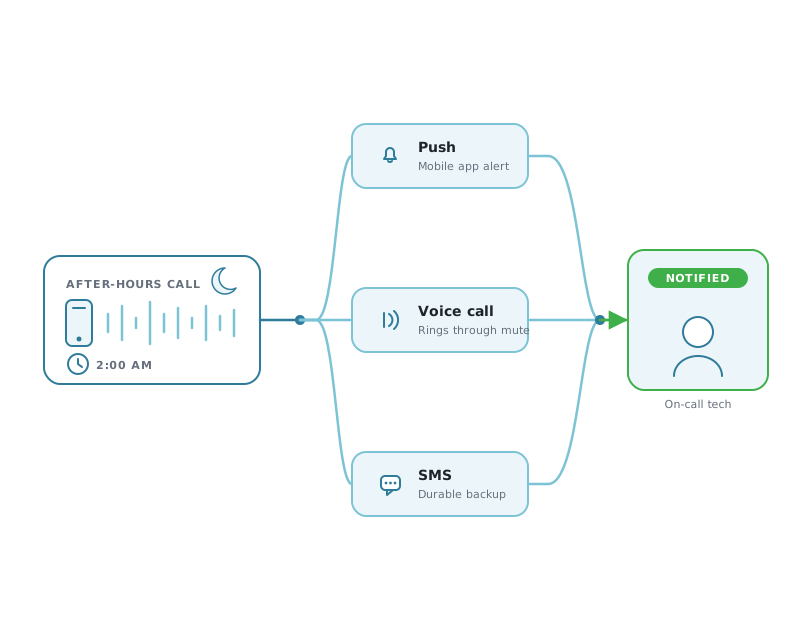
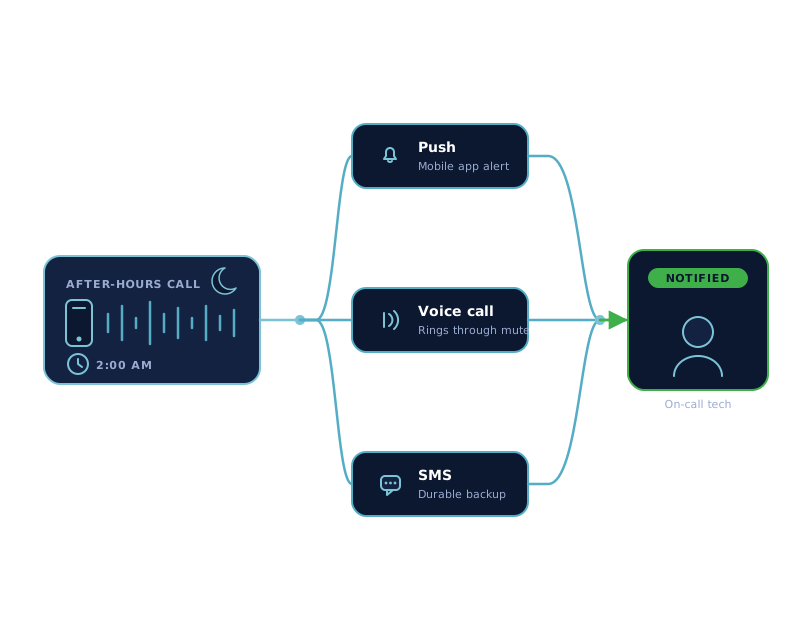
Emergencies reach the on-call technician in seconds, with under-30-second dispatch, through push, an automated voice call, and email, with SMS on the final attempt. Callbacks are masked to protect the tech’s personal number.
4 · Recordings and reporting
Every resident message and AI conversation is recorded and transcribed in English or Spanish, the technician’s callback is recorded, and all of it rolls into reporting, then flows into Yardi, RealPage, Entrata, or ResMan so nothing lives in a silo.
Why triple notification matters.
One channel is a single point of failure. A push notification goes unseen, a phone is on silent, a voicemail is never checked. At 2 a.m., one missed message is a flooded unit by morning.
Push
An instant push to the on-call tech’s Activ mobile app, the fastest path when the phone is nearby.
Voice call
An automated voice call that rings through even when notifications are muted, so an urgent dispatch is hard to sleep through.
SMS
A text on the final attempt as a durable, glanceable backup. The message is waiting the moment they wake.
If the first technician doesn’t respond, Activ escalates to the next person in the rotation. If the whole list is exhausted, everyone subscribed to that call gets a high-importance email.
Protecting maintenance teams from burnout.
You spend real money recruiting and training maintenance technicians. Bad after-hours handling is one of the fastest ways to lose them.
When a personal cell number ends up on a flyer, that technician gets calls on their day off, hears from residents directly, and has no privacy, and when they leave, your “system” leaves with them. Activ routes through a real on-call rotation instead, so the right person is notified on their shift and no one’s private number is exposed. Masked callback lets a tech call a resident back without ever revealing their own number.
Just as important is what doesn’t reach them. By triaging non-emergencies out of the overnight dispatch path, Activ keeps your best technician from being woken for a request that could have waited until 8 a.m., the single fastest way to burn out the person you most need to keep.
IVR or conversational AI: choose the right intake style.
Activ is one of the few multifamily services that lets you pick how residents are answered, and switch later, without changing the dispatch, scheduling, reporting, or PMS workflows underneath.
Answer Automate (IVR)
A crisp, menu-driven experience every caller already understands: press for an emergency, press for the office, press to leave a message. Predictable and battle-tested across thousands of properties. Explore Answer Automate →
Answer Intelligence (Conversational AI)
A natural spoken conversation that captures context in the resident’s own words, covering maintenance emergencies, lockouts, office hours, and pet and amenity questions, then dispatches with the same speed and reporting. Explore Answer Intelligence →
Weighing the two? Our IVR vs conversational AI guide walks through resident experience, emergency routing, context capture, and when each model fits.
Connected reporting and PMS workflows.
After-hours calls are only useful if the record survives the night.
Every after-hours call is logged, with the resident’s message or AI conversation recorded and transcribed, and rolled into reporting your regional and corporate teams can actually see: volume, response times, emergency rates by property, and language mix. Instead of a stack of message slips, you get a clear operational picture the next morning.
Because Activ connects to Yardi, RealPage, Entrata, and ResMan, that record doesn’t live in a silo. It flows into the workflows your teams already use. For a deeper look at the operational side of after-hours coverage, see our guide on how to handle after-hours maintenance calls.
After-hours answering, answered.
What is an after-hours answering service for apartments?
It’s a service that answers resident calls when your office is closed, decides what counts as an emergency, dispatches true emergencies to the on-call technician, and logs everything else for the morning. A multifamily-specific service like Activ also records, transcribes, and pushes the record into your PMS.
How fast does an emergency reach the on-call technician?
Activ delivers emergencies with under-30-second dispatch through push, an automated voice call, and email, with SMS on the final attempt. If the first technician doesn’t respond, the call escalates to the next person in the rotation.
How is this different from a generic call center?
A generic call center reads a script but doesn’t know your properties, on-call rotation, or what your community treats as an emergency. Activ is built for multifamily: it triages accurately, routes to the right tech, protects technician privacy, and connects to Yardi, RealPage, Entrata, and ResMan.
Does it protect my maintenance technicians’ privacy?
Yes. Activ routes through a real on-call rotation rather than a personal cell number, and masked callback lets a technician call a resident back without exposing their own number.
Can residents be answered in Spanish?
Yes. Both IVR and conversational AI intake work in English and Spanish, and resident messages and AI conversations are transcribed in the language spoken.
Do I have to choose between IVR and AI?
No. You choose the intake style that fits your community and can switch later. The dispatch, scheduling, reporting, and PMS workflows underneath are the same either way.