
How many after-hours calls are real emergencies?
In August 2026, across a sample of 3,000 apartment communities, one in three calls that reached the emergency maintenance line ended without calling the on-call technician: 27% ended after the caller heard the property’s emergency criteria, and 6% left a message for the office instead. Maintenance accounted for 11% of after-hours calls.
Every one of those calls would have gone out to someone under a system that notifies the technician for anything reaching the maintenance line. A call-out that could have waited until morning costs the community a trip charge or overtime, and it costs the technician a night of sleep before a full working day.
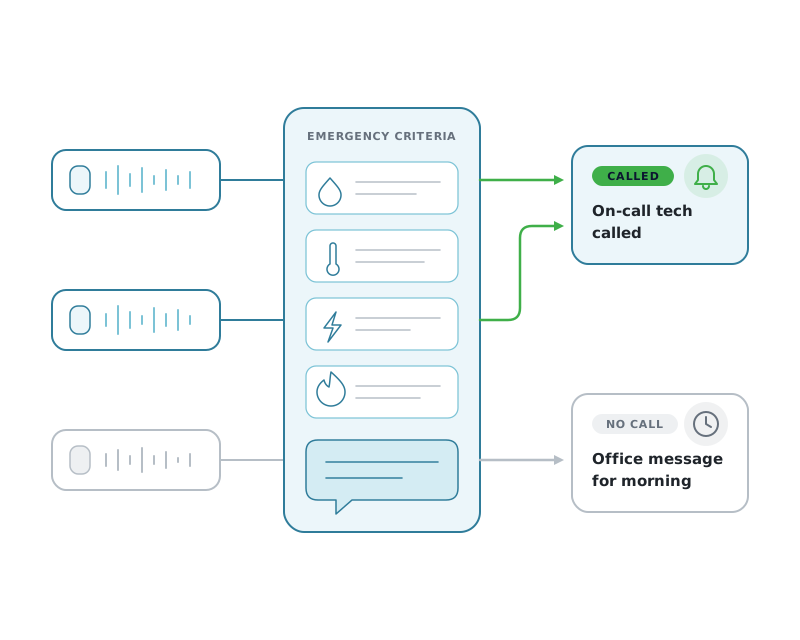
How do I stop non-emergency calls from waking the on-call technician?
Decide in writing what your community treats as an emergency, have the after-hours line read those criteria to every caller before they can leave a message, and send everything else to the office. Across a sample of 3,000 communities in August 2026, one in three calls that reached the emergency line ended without calling the on-call technician.
One month, a sample of 3,000 communities, every call traced end to end.
These are Activ’s own call records for August 2026, not an industry estimate or a survey.
After-hours only
Each call is placed against its community’s own office hours and time zone. Business-hours calls are excluded.
The whole path
Every keypress is recorded, so a call counts as reaching maintenance when the caller actually landed on that prompt, whatever they did next.
Called means attempted
It counts when Activ called or texted the on-call technician, or transferred the call. Failed attempts count too.
Per community too
The headline shares pool every call, so busier communities count for more in them. The range across communities is reported separately, giving each community equal weight.
What happens after a caller reaches the emergency line.
Shares of the calls that reached the emergency maintenance prompt, rounded to the nearest percent.
-
62% Emergency reported, on-call technician called
The caller left a message reported as an emergency, and Activ called the on-call technician.
-
27% Call ended after the emergency criteria were read
The caller reached the emergency prompt, heard what the community treats as an emergency, and ended the call without leaving a message.
-
6% Message left for the office instead
The caller moved from the emergency prompt to the office or courtesy prompt and left a message there for business hours.
-
2% Emergency message, nobody called
Mostly recordings too short to contain a request, plus a small number of communities with no active on-call schedule at that moment.
-
2% Transferred without a message
The call was handed to a configured destination rather than captured as a message.
Communities vary widely. In the middle half of them, screening accounted for between 18% and 50% of emergency-line calls, counting the calls that ended after the criteria and the messages left for the office. Each community sets its own emergency criteria, and its own line behaves accordingly.
Residents screen themselves when the line tells them what qualifies.
The emergency prompt reads out what that community treats as an emergency: an active leak, no heat in freezing weather, a gas smell, sparking outlets. A resident calling about a dripping faucet or a garbage disposal hears that list and hangs up, or takes the option to leave a message for the office. That is the screening doing its work, before anyone is woken.
Nothing is lost when a caller leaves a message for the office instead. The recording, the transcript, and the caller’s number are waiting when the office opens, and the request is handled during business hours at business-hours cost.
The remaining 62% are reported as emergencies, and they call the on-call technician. The first notification goes out in under 30 seconds from the end of the call, through push, an automated voice call, and email together, and the escalation continues to the next person on the schedule if nobody answers.
Four numbers your answering service should be able to give you.
Ask for these per community and per month. A service that cannot produce them cannot tell you what your after-hours line is doing.
- 1 How many after-hours calls reached the maintenance option.
- 2 How many of those called the on-call technician.
- 3 How many were captured as messages for the office instead.
- 4 How long it took from the end of the call to the first notification.
The second number against the first is your screening rate. Track it per community and the outliers tell you where the emergency criteria need rewriting: a property calling the technician on nearly every call usually has a prompt that never says what an emergency is.
Two ways to apply the same rules.
With Answer Automate (IVR), your emergency criteria are read at the maintenance prompt and every message left there is treated as an emergency. Anything that does not qualify goes to the office as a message. The rules are stated to the caller, and the caller decides.
With Answer Intelligence (conversational AI), the whole conversation is captured, so the resident describes the problem in their own words and Activ classifies it against your community’s criteria. That gives a category the IVR menu cannot: a maintenance request recorded as a non-emergency, which is logged for the morning rather than routed to the office as a general message.
That distinction matters for work orders. Where automatic work order creation is available, conversational AI can open work orders for both the emergency and the non-emergency, so the Tuesday-morning ticket is written the moment the resident calls on Monday night.
Either way, the standard applies the same on every call, and every call is logged; a resident’s message, or the whole AI conversation, is recorded. For the rubric itself, see what is considered a maintenance emergency. For how the dispatch works once a call qualifies, see maintenance dispatch, and for the full workflow, the after-hours answering service.
Common questions about emergency-line screening.
- How many after-hours maintenance calls are real emergencies?
- In August 2026, across a sample of 3,000 apartment communities, 62% of the calls that reached the emergency maintenance line resulted in an emergency message and a call to the on-call technician. One in three ended without calling anyone: 27% after the caller heard the community’s emergency criteria, and 6% as a message left for the office instead.
- What share of after-hours calls are about maintenance at all?
- Maintenance accounted for 11% of after-hours calls in the same period. Most after-hours calls to an apartment community are leasing enquiries, package questions, courtesy matters, and calls for the office.
- Does screening mean residents get turned away?
- No. Every caller can leave a message, and screening decides who gets woken up rather than whether the resident is heard. Where the caller leaves one, the recording and transcript are waiting for the office in the morning.
- How do you measure this on your own line?
- Count the calls that reach your emergency option, then count how many of those actually called someone. If your current service cannot report both numbers per community, it cannot tell you what your after-hours line is doing.