
Resident communication in one shared inbox.
Email and text your residents, then handle their replies as a team. Every notice, reply, assignment, and internal note stays with the resident conversation it belongs to, with unlimited messages for your community.
Sending the pool-hours notice is the easy part. Then Maya texts back asking whether she can bring a guest, Jordan replies by email about a package, and both answers land in one staff member’s mailbox. Resident Messaging keeps those replies in Activ, where anyone on the property team can pick them up, see who is handling each one, and answer on the channel the resident used.
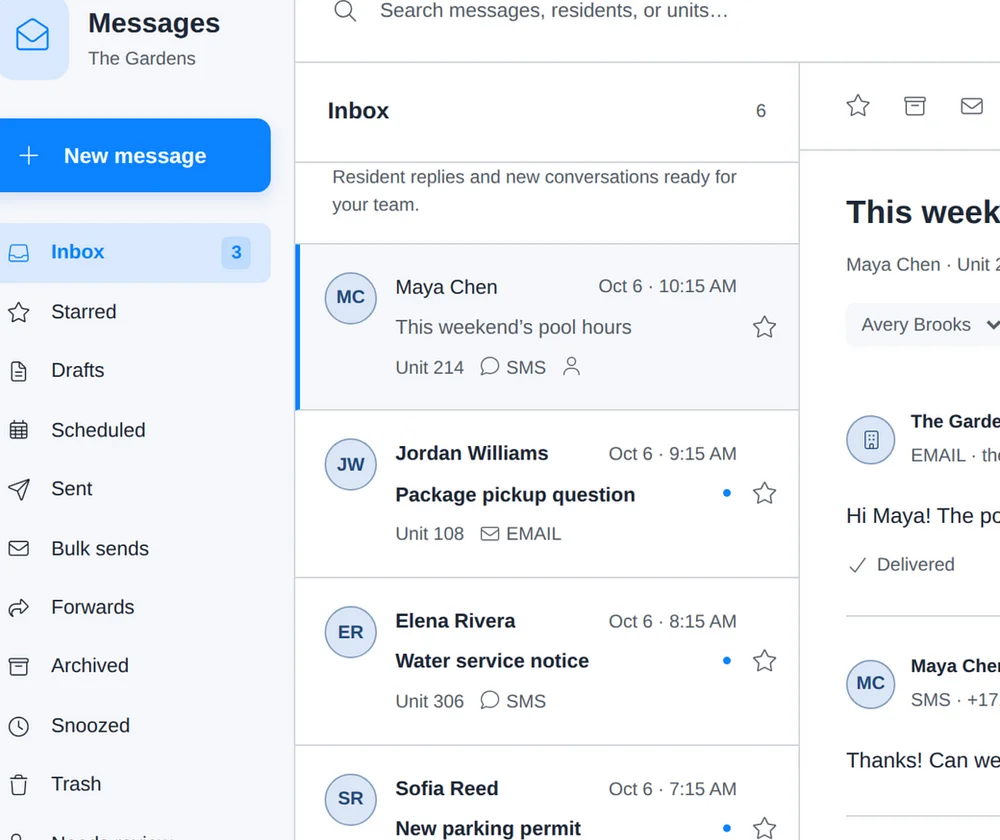
Email and text in the same conversation.
Every resident on a community-wide notice is messaged privately. When one replies, the reply opens a conversation between that resident and your team.
Private to each resident
A community-wide notice never becomes a group chat. A resident’s reply goes to the property team and no one else.
Both channels, one thread
A conversation can start with an email notice and continue by text. Outgoing messages and replies on both channels sit together.
Replies follow the resident
Click Reply and it opens on the channel of the resident’s latest message, so someone who texted gets a text back.
No app for residents
Residents answer from their own email or phone. They can also email the property’s messaging address to start a conversation.
Your whole property team works from the same inbox.
Replies stop depending on who happened to receive the forward. Everyone with access sees the same conversations, and the inbox shows who owns each one.
Assignment
Give a conversation to a team member so ownership is clear, and filter the inbox by assignee. Everyone else can still open it.
Labels
Sort conversations by topic, such as Maintenance, Amenities, or Move-in, with your own label names and colors.
Internal notes
Leave a note for the next person on shift. Notes stay inside the property team and are never sent to the resident.
Star, archive, snooze
Star what matters, archive what is finished, and snooze a conversation until you are ready for it. A new reply brings an archived conversation back.
Resident details
Open the resident’s contact details, channel subscriptions, and other conversations without leaving the thread.
Search by resident or unit
Find a message by its words, the resident’s name, or the unit number, and filter by channel, label, date, or unread.
When a message arrives from an address or number that does not match one resident, for example someone writing from a new email address, it waits in Needs review until a team member confirms who sent it. Conversations can be forwarded by email, printed, or exported, and internal notes are left out of all three.
Send to the residents who need it.
Choose individual residents, buildings, units, or everyone, then narrow the audience with tags such as pet owners or garage parking.
Write the email and the text separately, since a formatted notice with a photo rarely makes a good text message. Our resident notice templates show both versions for seven common notices. Email supports formatting, images, and personalization such as %first_name% or the resident’s unit. Text messages start with your property’s short name and show the property’s character limit as you write. Attach files up to 25 MB each, which arrive as download links, or start from a saved template.
| Delivery method | Who receives it, and how |
|---|---|
| Email Only | Every resident with an eligible email address. |
| SMS Only | Every resident with an eligible mobile number. |
| Both SMS and Email | Each channel the resident can receive. |
| Prefer Email | Email where possible, a text for residents without an eligible email address. |
| Prefer SMS | A text where possible, email for residents without an eligible mobile number. |
Review before it leaves the property
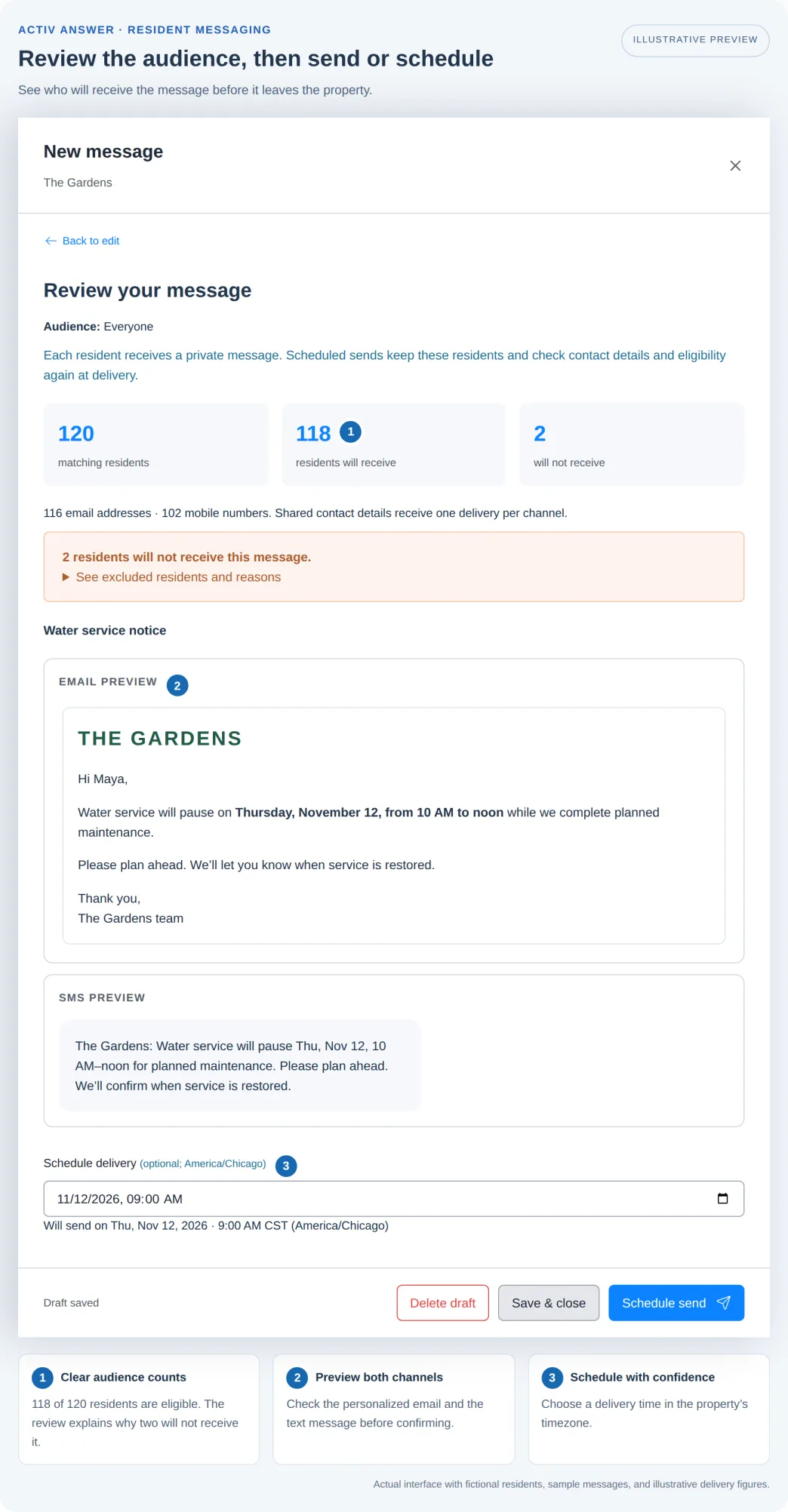
The review screen shows how many residents match, how many will receive the message, and why anyone will not: an inactive resident, a missing or invalid contact, an unsubscribe, or no SMS consent. It previews both the email and the text.
Send now, or schedule it. A 9:00 AM schedule means 9:00 AM in the property’s timezone, wherever the person scheduling it sits. Drafts save as you write and are shared with the team, so a notice started on Friday can be finished by someone else on Monday.
See what happened after you hit send.
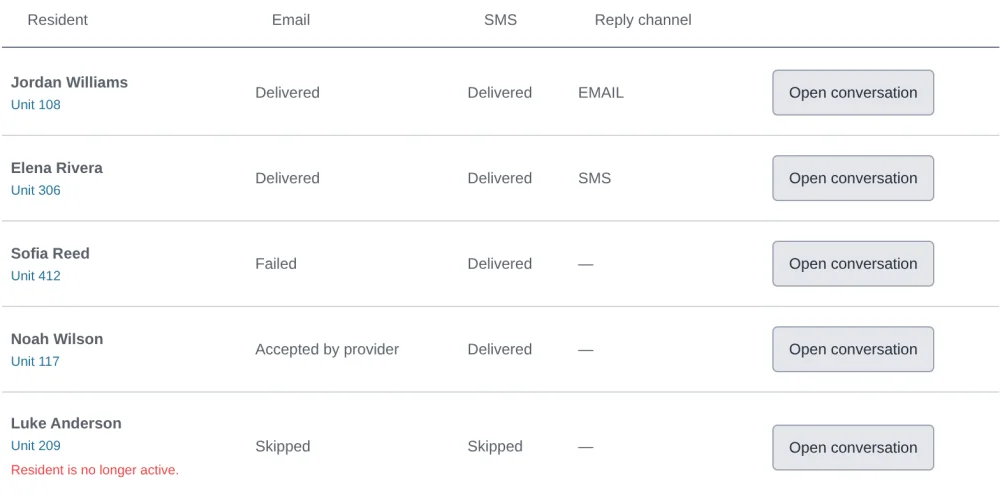
Every property send keeps its original message, its audience, and a delivery result for each resident on each channel.
Each resident’s row shows whether the email and the text were delivered, failed, are accepted and awaiting confirmation, or were skipped, with the reason for a skip. Email opens and clicks are reported for the send as a whole. When a delivery failed, Open conversation takes you from that row straight to the resident, so follow-up starts from the result instead of a spreadsheet.
Messages residents recognize.
Residents should know a notice came from their community before they open it.
A readable address
New properties get a messaging address built from their name, such as the-gardens@messaging.activanswer.com.
Your logo
Upload the property logo and it heads your emails. Without one, the email header shows the property name.
A shared signature
Set a formatted email signature once and every new message starts with it.
A short name for texts
Text messages open with the property’s nickname, so residents know who is texting.
Residents can be imported directly, with no integration needed. Communities on one of our Yardi, RealPage, Entrata, or ResMan integrations keep residents and units in sync automatically. Subscriptions are kept per channel, replies such as STOP update them on their own, and every send is checked against current subscriptions before it goes out.
The same platform answers your phones. See our apartment answering service for after-hours calls and maintenance dispatch, or package tracking for pickup notices.
Resident Messaging, answered.
Is a property-wide notice a group text?
No. Every resident receives a private message. When Maya replies to the pool-hours notice, her reply reaches your team and nobody else, and it opens a conversation between Maya and the property.
Do residents need an app or a login to reply?
No. Residents reply from their own email app or by text, the same way they answer anyone else. They can also email the property’s messaging address directly to start a new conversation.
Can one conversation use both email and text?
Yes. A conversation can start with an email notice and continue by text. Outgoing messages and replies on both channels sit in one thread, and your reply goes out on the channel the resident last used.
How many messages can we send?
Resident Messaging includes unlimited messages, whether a notice goes to one resident or to the whole community.
Do we need a property management system integration?
No. You can import residents directly. If you use one of our PMS integrations, residents and units stay in sync automatically.
How are opt-outs and SMS consent handled?
Subscriptions are kept per channel, so a resident can take email and not texts, or the reverse. Replies such as STOP update the resident’s subscription automatically. Before any send that can use text, staff confirm they have the residents’ consent, and every send is checked against current subscriptions before it goes out.
We already use Resident Messaging. How do we move to the Inbox?
Existing customers move to the Inbox property by property, on a schedule agreed with our team. Available message and reply history and your scheduled messages come with you, and you review them before the property switches over. Until then, your current messaging screens keep working as they do today. Contact us to plan the move.