
How to handle after-hours maintenance calls.
What happens after the office closes shapes how residents feel about living at your community. This guide covers what after-hours call handling needs to solve, the mistakes that cost renewals, and a checklist for evaluating your options.
A burst supply line at midnight, a lockout in the rain, an AC failure in July: after-hours calls are where a community either protects its residents and its assets or leaves them waiting. The goal isn’t to answer every call the same way. It’s to get the true emergencies to a technician fast and handle everything else without waking one up.
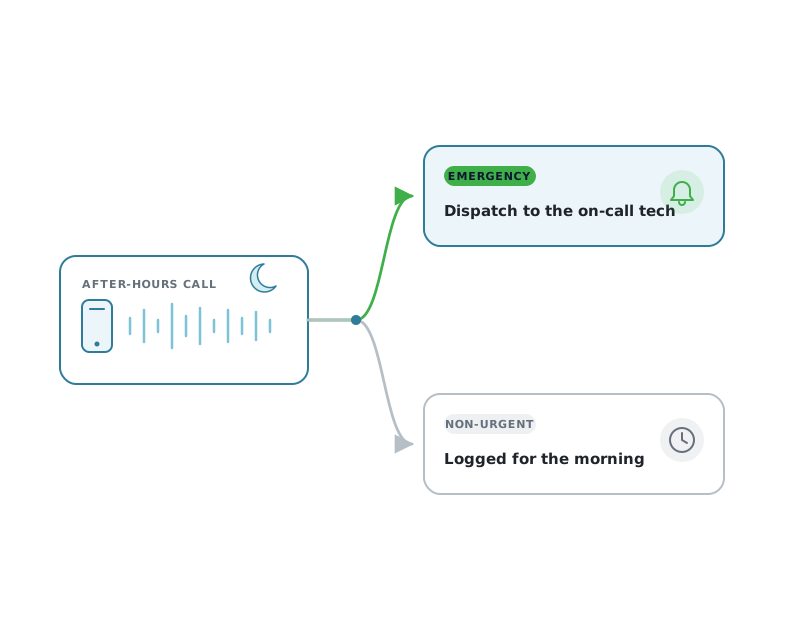
What should happen when a resident calls after hours?
The call gets answered and the resident describes the problem in their own words. On a phone menu, the caller picks the maintenance option and a message left there triggers a call to the on-call technician, with the recording and the details attached; with conversational AI, the service classifies what the resident describes against your written criteria. Anything reported to the office instead waits as a message the office picks up in the morning.
After-hours handling is a retention issue.
Maintenance responsiveness is one of the strongest drivers of whether a resident renews. Nothing tests it like a 2 a.m. emergency.
When a resident’s ceiling is leaking, they remember one number: how long it took someone competent to respond. A fast, calm, well-documented response turns a bad night into a story about how much the community cares. A voicemail box that fills up overnight does the opposite, and it shows up at renewal time.
It cuts the other way for your team, too. Every unnecessary middle-of-the-night dispatch burns out the on-call technician you can least afford to lose. Good after-hours handling protects residents and staff at the same time, which is largely a question of how you build the on-call rotation.
Voicemail, a generic call center, or real multifamily answering.
These three get lumped together as “after-hours coverage.” They are not the same thing.
Voicemail
A recording. No triage, no dispatch, no record beyond a message someone has to remember to check. Emergencies wait until morning, and so does the water damage.
Generic answering service
A live person reads a script, but doesn’t know your properties, your on-call rotation, or what your community treats as an emergency. Messages get relayed slowly and sometimes wrongly.
Multifamily answering
Built for apartments: it knows the community, decides what counts as an emergency, dispatches to the right on-call tech in seconds, and leaves a complete record for the morning.
Five mistakes that cost renewals.
Routing to a personal cell phone
One tech’s number on a flyer means missed calls on their day off, no backup, and no privacy. When they leave, the “system” leaves with them.
No clear definition of an emergency
If nobody has decided what qualifies, residents decide for you, and everything becomes a 2 a.m. dispatch, or nothing does.
No backup rotation
When the on-call tech doesn’t answer, what happens next? Without an escalation path, urgent calls simply fall through.
No written record
A call you can’t reconstruct the next morning is a liability. You need who called, when, what they reported, and what was done.
Slow or missing follow-up
Even handled emergencies need a morning loop-back. Silence after a stressful night reads to the resident as “nobody cared.”
Treating every call as urgent
The opposite failure. If non-emergencies keep dispatching, your best technician burns out and stops answering the calls that truly matter.
What to ask any after-hours option.
Whether you’re comparing providers or building a process in-house, work through these before you commit.
- Does it know what your community treats as an emergency?
- How fast does a true emergency reach the on-call technician?
- Does it support real on-call rotations, backups, and holidays?
- Is there an escalation path if the first tech doesn’t answer?
- Does it protect technician privacy on callbacks?
- Is every resident message recorded, transcribed, and available the next morning?
- Can it handle residents who don’t speak English as a first language?
- Does it connect to your PMS so records don’t live in a silo?
How Activ Answer handles the after-hours call.
Activ is built specifically for multifamily, not a generic service adapted to it. Here’s the shape of a call from ring to record.
A resident calls and is answered the way your community chose: a familiar menu with Answer Automate (IVR), or a natural conversation with Answer Intelligence (conversational AI). True emergencies drop into dispatch and reach the on-call technician in seconds through push, voice, and email, with SMS on the final attempt. Callbacks are masked to protect the tech’s number. Non-emergencies are captured and logged for the morning instead of waking anyone up.
Every resident message and AI conversation is recorded and transcribed in English or Spanish, the technician’s callback is recorded, and all of it rolls up into reporting, with the record flowing into Yardi, RealPage, Entrata, or ResMan so nothing lives in a silo. For the full picture of how this works as a service, see our after-hours answering service for apartment communities. Not sure whether IVR or AI fits your community? Our IVR vs conversational AI guide walks through the trade-offs.