
Apartment answering that works with Entrata.
Activ Answer sits in front of your after-hours phone and works alongside Entrata: residents and units stay in sync, urgent maintenance gets dispatched in seconds, and every call is reported, with the resident’s message or conversation recorded and transcribed. No rip-and-replace, no new system for your team to learn.
You already run your community on Entrata. Activ doesn’t ask you to change that. It adds multifamily-specific answering on top, including IVR or conversational AI intake, fast on-call dispatch, a mobile app for technicians, and bilingual transcripts, then feeds the results back into a picture your regional and corporate teams can actually see.


Your Entrata resident data, on every call.
Activ syncs residents and units from Entrata so an inbound after-hours call is matched to the right person and address before your on-call tech ever picks up.
When a resident calls, Activ already knows who they are and which unit they’re in, with no spelling out names or hunting for addresses at 2:00 AM. That same current resident directory powers Activ’s resident messaging, so email and SMS reach the right people without a second import to maintain.
The sync keeps Entrata as your system of record. Activ reads resident and unit context; it doesn’t ask you to manage residents in two places.
-
Resident & unit syncCallers matched to their unit and address automatically.
-
Powers resident messagingThe same directory drives Activ email and SMS, with no second import.
-
Entrata stays the source of truthActiv reads context. You keep managing residents in Entrata.
-
No hardware, no IT projectA configuration step, not a migration or an install.
Context in, accountability out.
The integration is about closing the gap between an after-hours call and what your team sees the next morning.
Right resident, right unit
Calls arrive tied to a known resident and address, so dispatch context is accurate from the first second.
Faster maintenance dispatch
Emergencies reach the on-call technician in seconds: push, voice, and email together, SMS on the last attempt.
Bilingual transcripts
Resident messages and AI conversations are recorded and transcribed, with EN/ES translation so urgency is never lost in a language gap.
Portfolio-wide reporting
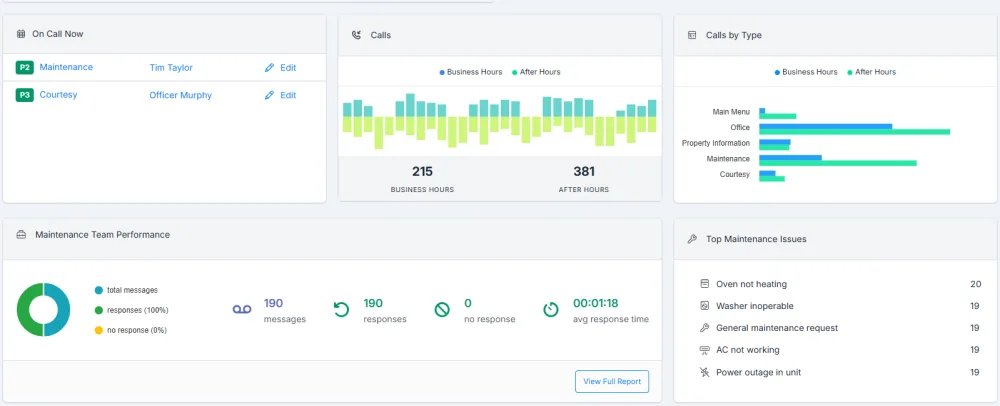
Regional and corporate teams see calls, response times, and maintenance patterns across every community.
Maintenance calls become Entrata work orders.
Activ can put every maintenance call into Entrata as a work order, automatically as the call is processed or after your staff reviews it. No one re-keys it in the morning.
Choose automatic, and the work order is created moments after the call ends, for every maintenance message, with no staff action and no manual re-entry. With conversational AI, that includes routine requests. With IVR, every maintenance message is an emergency, and callers whose problem can wait leave a message for the office instead, where staff can create the work order manually. Choose manual, and each maintenance call gets a create option in the Activ web and mobile apps, so your staff reviews the details before anything is sent.
Automatic creation matches the caller’s number to a current Entrata resident, so the work order lands on the right unit. Nothing about notification changes: the same people hear about the call, and on-call dispatch for emergencies carries on as usual. The work order sits alongside the process you already run rather than replacing it.
Once it exists, the work order belongs to Entrata. Activ shows its current status but never assigns, changes, or closes it. See how Activ handles work orders across every integration.
What lands in Entrata.
What an Activ work order carries into Entrata, so your team can act on it without replaying the call.
- Resident
- The resident matched to the caller’s number, or the resident your staff selects. Every Entrata work order is tied to a resident record.
- Property and unit
- Read from the resident’s Entrata record, never typed by hand.
- Problem and category
- Your property’s defaults on automatic orders. On manual orders, staff pick the problem from your Entrata list, and the category follows it.
- Permission to enter
- Granted on automatic orders, with a standard entry note. Staff can change both on manual orders.
- Description
- Entrata keeps one free-text description, so the call details share it: the time of the call, the number it came from, the detected language, how the issue was classified, and the transcript, including the original-language version when the caller did not speak English. The field holds up to 4,000 characters.
Creating one by hand
Manual orders start from the call in the Activ web or mobile app. Your staff selects the resident, picks the problem, and can edit the description before sending, and the Entrata work order number comes back right away.
When an automatic work order cannot be created
Sometimes the caller’s number does not belong to a current resident, or Entrata turns the request down. The call is never lost: its usual recipients still get the message, and emergencies still reach on-call staff. The office receives an action-required email saying the work order was not created, so someone can pick it up. Keeping resident mobile numbers up to date in Entrata is what keeps automatic matching reliable.
Already using Entrata? See how Activ connects.
Bring us the way your communities run today. We’ll show you the sync, the dispatch flow, and the reporting, on a call that fits your Entrata setup.
Activ Answer + Entrata, answered.
Does Activ Answer replace Entrata?
No. Entrata stays your system of record for residents, units, and operations. Activ adds after-hours answering and maintenance dispatch on top, and syncs resident data so calls arrive with the right context.
What data syncs from Entrata?
Activ syncs your resident and unit directory so inbound callers are matched to their unit and address. That same directory also powers Activ’s resident email and SMS messaging, so you don’t maintain a separate list.
Does Activ create work orders in Entrata?
Yes. Activ can create a work order in Entrata for every maintenance message, either automatically moments after the call or after your staff reviews it. With IVR, routine requests are left as office messages instead, and staff can create those work orders manually. Automatic orders take the resident and unit from your Entrata records, the call details travel with the order, and there is no manual re-entry.
Who manages the work order after Activ creates it?
Your team, in Entrata. Activ shows the work order’s current status on the call, but it never assigns, changes, or closes it.
Is there hardware to install or an IT project to run?
No. Connecting Activ with Entrata is a configuration step, not a migration or an install. There’s no special hardware, and your team keeps working the way it already does.