
Portfolio-wide visibility into every after-hours call.
Regional and corporate teams shouldn’t have to call each property to find out what happened last night. Activ gives you aggregate performance and call data across a slice of communities or your entire portfolio: every call, recording, and conversation, in one place.
After-hours answering usually disappears into a black box: calls come in, someone gets dispatched, and corporate finds out only when something goes wrong. Activ closes that gap. The same platform that answers and dispatches also reports, so the people responsible for the whole portfolio can actually see it.
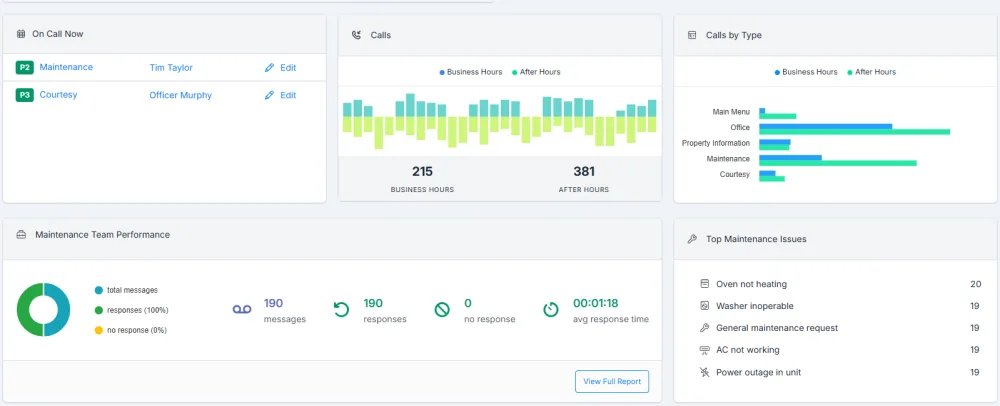
From a single property to the entire portfolio.
Corporate users have complete access to all communities, and can zoom from one site to a region to the whole organization without switching logins.
Look at one community when a manager asks about a specific night. Roll up a region to compare properties. Step back to the full portfolio to see where after-hours volume and emergencies are concentrated. The data is the same underneath. You’re just choosing how wide to look.
Review, and act, from one place.
Reporting in Activ isn’t read-only. The same access that lets you review calls lets you fix the things you find.
Review call reports
Call activity, response times, and outcomes across any set of communities you choose.
Listen to recordings
Listen to the resident’s recorded message, the technician’s callback, or the whole conversational AI call to hear exactly what a resident reported and how it was handled.
Read AI conversations
Review the full transcript of every conversational-AI call, in English and Spanish.
Change who’s on call
Fix a coverage gap or reassign the rotation at any community without waiting on the site team.
Update temporary greetings
Review and change temporary greetings, such as a holiday message or a weather closure, across properties.
Manage users
Add, remove, and adjust who has access, so the right people see the right communities.
Find the friction, not a scapegoat.
Use it to find coverage gaps and process problems.
Aggregate reporting shows you things no single property can: the community with a sudden spike in emergency calls, a maintenance issue recurring across buildings, a site where after-hours calls are going unanswered. Those are operational signals: a coverage problem to fix, a training gap to close, a property that needs help.
Answered well, after-hours maintenance is a renewal driver: residents remember whether their emergency was handled. Portfolio reporting is how you check that it happens at every community, including the ones that need the most help.
Corporate reporting, answered.
What can a corporate or regional user see?
Corporate users have complete access to every community. They can review call reports, listen to recordings, and read AI conversations across a single property, a slice of the portfolio, or the entire organization, all in one place, without logging into each community separately.
Can corporate users change settings, or only view?
Both. Beyond reviewing calls, corporate users can change who’s on call, review and update temporary greetings, and manage users, so a regional manager can fix a coverage gap or a holiday message without waiting on anyone.
Is this about monitoring my staff?
It’s about accountability, not surveillance. Reporting shows where residents are struggling, which properties generate the most after-hours volume, and whether emergencies are being answered, so you can fix process and coverage.
How does reporting help across many properties?
Aggregate data surfaces patterns a single property can’t: the community with a spike in emergency calls, a recurring maintenance issue across buildings, or a site where calls are going unanswered. That’s where portfolio-level reporting turns into better operations and stronger retention.